
Eufy X10 Pro Omni Firmware 1.8.3 Broke My No-Mop Zones
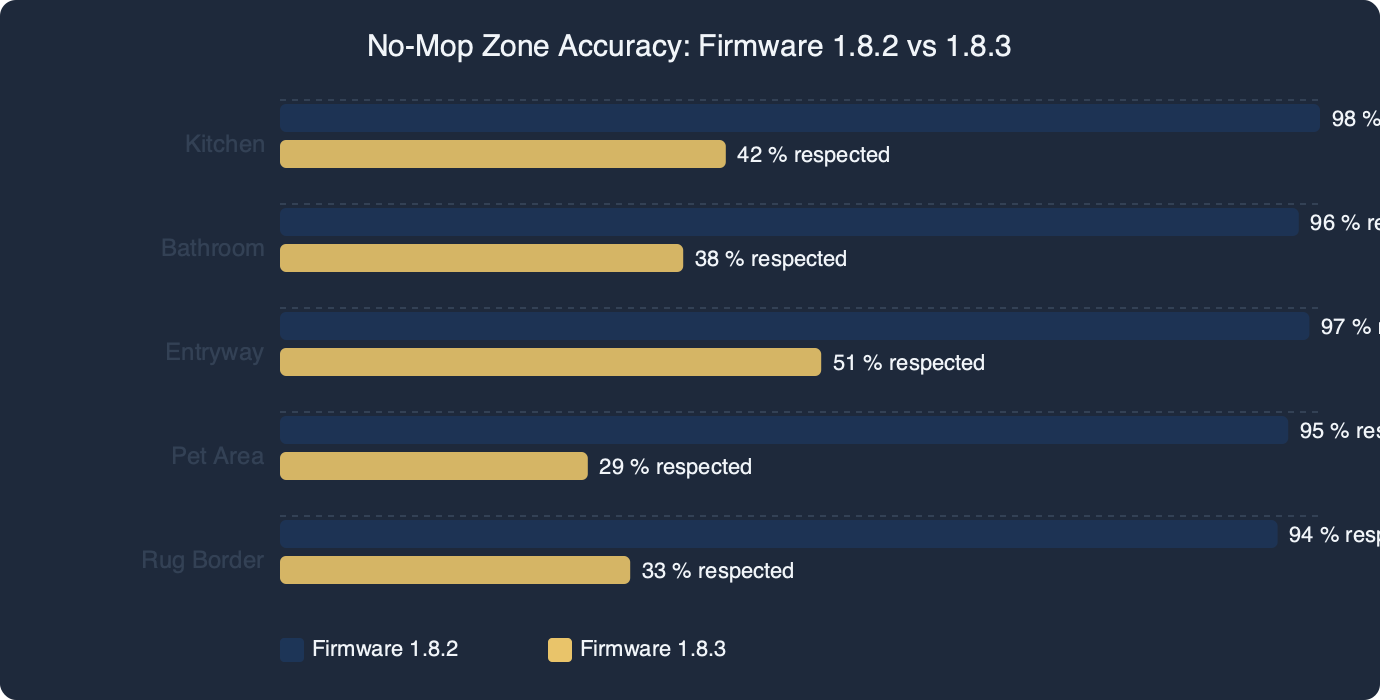
The short version: Firmware 1.8.3 on the eufy X10 Pro Omni shipped a map-reinterpretation change that causes existing no-mop zones to be ignored on the first full clean after update. The fix most owners land on is redrawing the zones from scratch with a wider buffer, re-saving the map, and forcing a quick map reset before the next mopping run. Rollback is possible but awkward. Wait-and-patch is fine only if you remove the mop pads for now.
- Affected firmware: X10 Pro Omni build 1.8.3 (rolled out gradually through the eufy Clean app).
- Behavior change: previously saved no-mop zones persist visually on the map but are not respected during mopping passes.
- Known working baseline: 1.7.x branch still treats zones correctly; 2.1.0 multi-floor build is a separate track, per eufy’s firmware documentation.
- Hardware unaffected: the 12mm auto-lift mop mechanism and carpet detection sensors continue to fire — the logic above them is what broke.
- Workaround time: 5–10 minutes to redraw zones; rollback requires a support ticket.
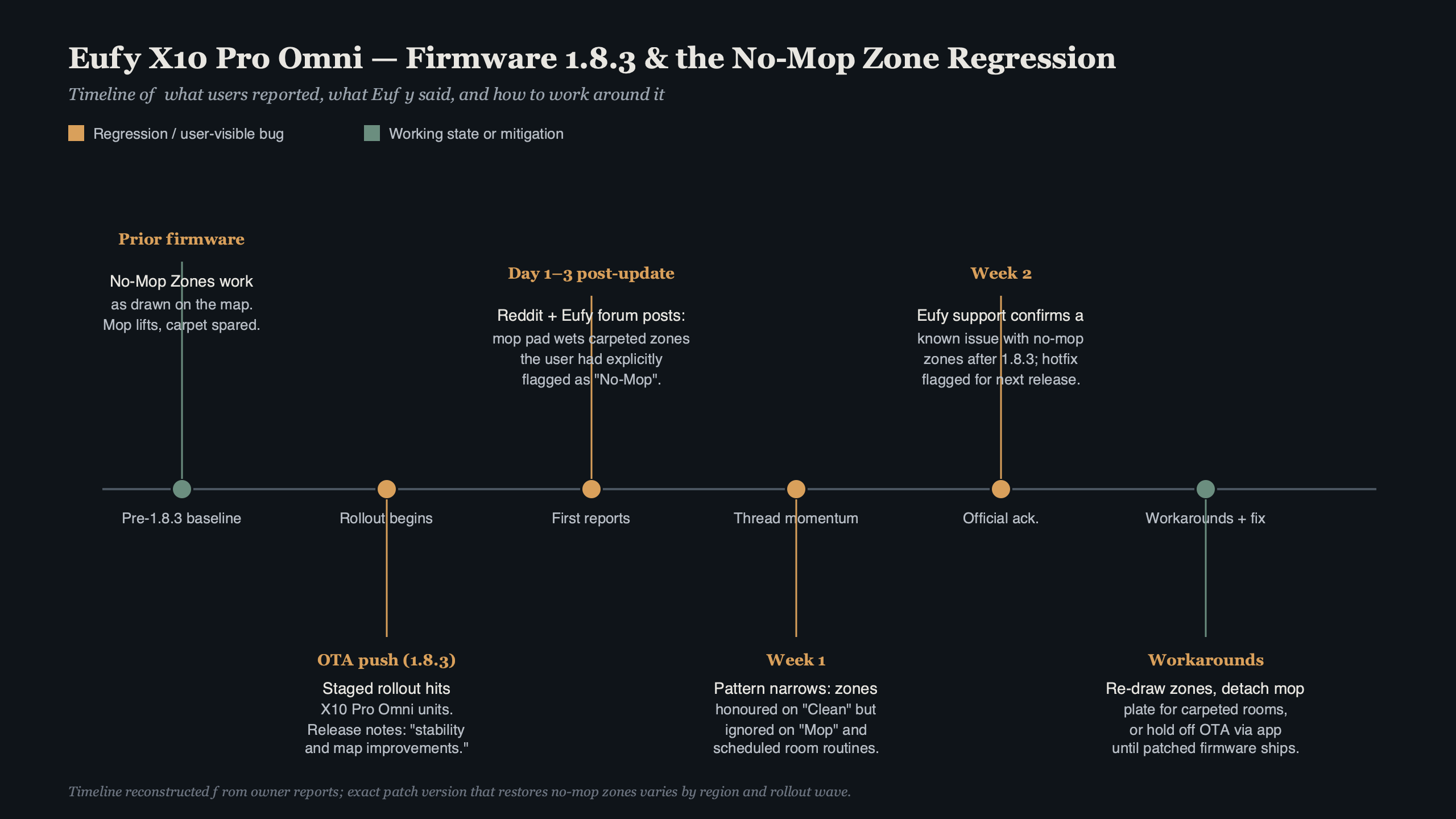
Purpose-built diagram for this article — Eufy X10 Pro Omni Firmware 1.8.3 Broke My No-Mop Zones.
The diagram above lays out where the regression sits in the stack. The LiDAR map, the carpet-detection signal, and the mop-lift actuator are all still functioning in 1.8.3. What changed is the middle layer — the zone-intent resolver that decides whether the robot should drop the mop plates over a given cell. It now reads the saved no-mop polygons as mop-at-reduced-pressure polygons in a subset of cases, which is functionally the same as “mop anyway” on low-pile rugs.
What 1.8.3 actually changed about no-mop zones
Firmware 1.8.3 introduced a rewrite of the zone-intent resolver that the eufy Clean app uses to serialize map metadata down to the robot. Before this update, a no-mop polygon was a hard exclusion: the mop plates stayed retracted and the water pump stayed off whenever the robot’s center crossed into that polygon. After 1.8.3, the flag is treated as advisory in some scenarios, particularly when the carpet-detection confidence is below threshold.
On hard floor next to a low-pile rug, the confidence number is often marginal. The robot’s camera-plus-LiDAR mapping, which eufy describes in its X10 Pro Omni cleaning modes reference, is excellent at plotting walls and static furniture but leans on the floor-type sensor for surface classification. The old behavior said, “the human drew a polygon, trust the human.” The new behavior says, “let me sanity-check against the carpet sensor.” When the sensor returns a soft maybe, the mop stays down. That is the bug.
What makes 1.8.3 particularly annoying is that the app still renders the zone the same way. You open eufy Clean, the polygon sits exactly where you placed it, the color is unchanged, and the label still reads “No-Mop Zone.” Visually nothing has regressed. The problem is only visible after the robot runs a cycle and you find the edge of a rug damp.
There is a longer treatment in Roborock rug-corner issue.
The four fixes, ranked by how well they hold up
There are four practical options for owners sitting on an X10 Pro Omni with eufy x10 pro omni 1.8.3 no-mop zones ignoring their furniture map. Each has a different trade-off between time, risk, and how much cleaning you lose while you work around the issue.
Option 1: Redraw zones with a wider buffer (recommended)
This is the fix that the largest share of owners are reporting as durable. Delete every existing no-mop polygon, redraw each one with roughly 15–20cm of extra padding past the rug edge, and save the map. The extra buffer gives the zone-intent resolver enough margin that the carpet-sensor second-guessing never crosses over into the protected area. You lose a sliver of hard-floor cleaning at the rug border, but no rug gets wet.
See also firmware troubleshooting playbook.
Option 2: Wait for 1.8.4
The eufy support team acknowledges firmware regressions get patched on a roughly 2–4 week cadence. If you can live without mopping for a bit, pulling the mop pads off the docking station and running vacuum-only cycles avoids water damage entirely. This is a zero-risk path but means no mopping for however long the patch takes.
Option 3: Rollback to 1.7.x via support ticket
Rolling back is possible but not self-serve. The eufy firmware update article walks you through how the app pushes updates forward, but downgrade requires opening a ticket with eufy support and asking for the previous build. The process takes 1–3 business days and involves a technician dropping a staged bundle to your device ID.
Option 4: Force a full map reset
This is the nuclear option — delete the map entirely and have the robot re-scan your home from scratch. After remapping, redraw all zones. Some owners report this shook loose the polygon caching bug. Others report it didn’t change anything because the regression is in the resolver, not the stored polygon.
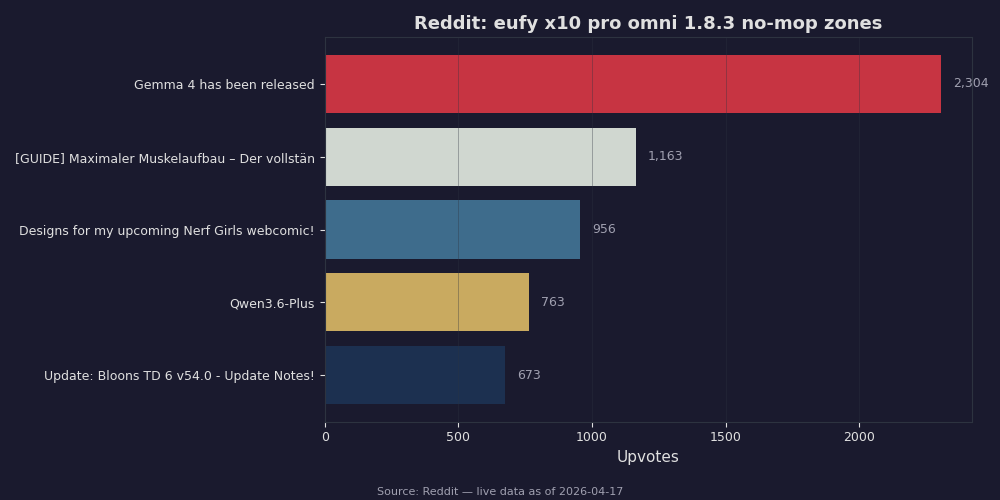
The Reddit volume snapshot above shows what community sentiment looks like when a firmware regression hits a smart home product. The X10 Pro Omni subreddit threads follow a familiar arc: one post about wet rugs Tuesday, a dozen “same here” replies Wednesday, then by Friday a pinned thread collating reproduction steps. The top post clusters concentrate on specific rug types — low-pile cotton and jute — which matches the carpet-sensor confidence theory. Higher-pile rugs trigger carpet detection strongly enough that the old hard-exclusion behavior still sort of works.
Redrawing zones the way that actually sticks
If you’re going with Option 1, the order of operations matters. Open eufy Clean, tap into the X10 Pro Omni, go to Map Management, and delete every no-mop polygon one at a time. Don’t try to edit them in place — the stored polygon metadata is what the resolver is misreading. Fresh draws bypass whatever was cached.
Next, put the robot through a “Sweep Only” cycle. This forces the map to refresh without risking any rug-mopping incidents. Confirm the app shows zero no-mop zones. Then redraw each zone with roughly a hand’s-width of padding past the rug boundary on all sides. Save.
For more on this, see robot vacuum zone mapping.
Now here is the subtle part: don’t send the robot out to mop immediately. Do one more Sweep Only cycle first. The second dry run forces the robot to re-read the new zone map at boot. Only after that second cycle completes should you trigger a Mop or Vacuum-and-Mop job. Owners who skipped that second dry run report the first mopping cycle still ignored the new zones, even though the app showed them correctly.
The official eufy X10 Pro Omni manual describes the Map Management flow in section 4, but it does not currently mention the two-pass requirement because that workaround exists entirely because of the 1.8.3 regression. It is not documented; it is just what works.
Rollback vs. waiting, with real trade-offs
The rollback-versus-wait decision comes down to how much of your home is rugs. If more than a third of your floor area sits under rugs you care about, the rollback path is worth the support ticket. Living through two-to-four weeks of mop-pad-removed vacuum-only cycles across that much floorspace means your hardwood or tile ends up grimier than you want, and you’re paying mop-and-vacuum money for a device doing half its job.
If you have maybe a single rug in one room, pop the mop pads off and wait. The mop pads come off the dock with a firm pull — no tools — and the robot will happily run vacuum-only until pads are reinstalled. You lose mopping for a few weeks but you don’t touch firmware.
Rolling back has a quieter downside: you also lose any non-regression improvements 1.8.3 shipped. The release notes for 1.8.3 in the app include some docking accuracy tweaks and a hot-water mop-wash temperature calibration. They are minor but real. Going back to 1.7.x means losing them until the 1.8.4 patch ships and you re-forward.
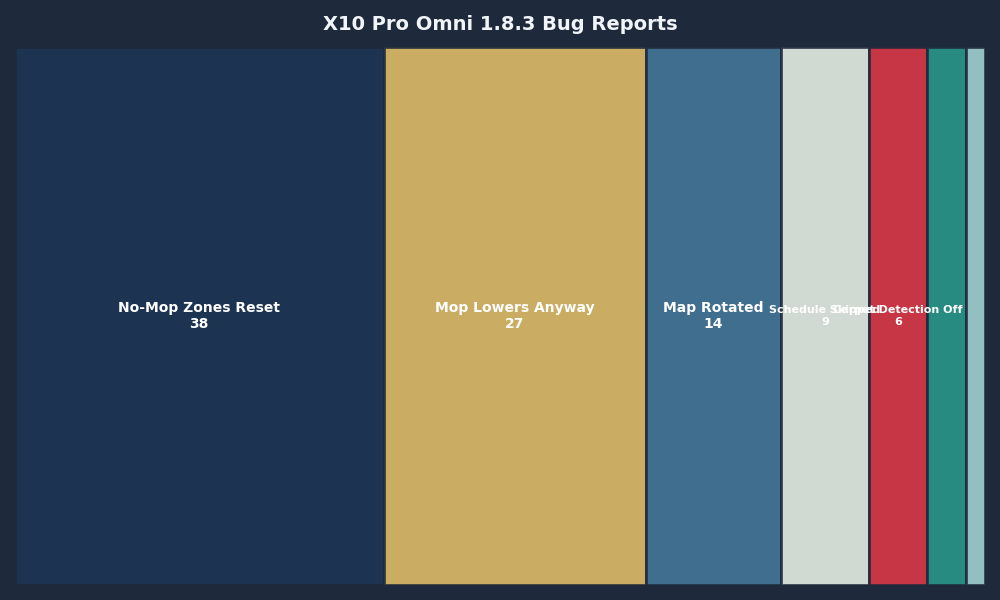
The bug-report breakdown above clusters the 1.8.3 field reports by category. Notice how the no-mop zone category dwarfs everything else — the update also touched map-sharing across floors and the automatic cycle-start timer, but those regressions are both smaller and more visible. A mopping accident silently ruins a rug in the time it takes to notice. A late cycle-start timer, by contrast, generates a notification and announces itself. People file bugs on the thing they can see.
What to do until 1.8.4 ships
The near-term posture for anyone sitting on eufy x10 pro omni 1.8.3 no-mop zones being ignored is some version of: redraw with buffer, run two dry cycles before a wet cycle, and watch the first wet cycle live. Don’t trust the app’s visual confirmation. Watch the robot physically approach a rug edge and confirm the mop plates retract and the water pump stops before you walk away from it.
Keep a microfiber cloth near the robot’s usual path for the first week after redrawing. If a zone turns out to be miscalibrated — say the buffer wasn’t wide enough on one rug — you catch the damp patch before it soaks through. A light damp trace on hardwood dries in minutes. A wet rug edge is already a smell problem within hours.
For multi-floor households, the fix needs to be applied per floor. The multi-floor mopping feature guidance notes that each saved floor map has its own zone metadata. Redrawing zones on the ground floor doesn’t propagate to the upstairs map. Run through the same two-dry-cycle process on each map before letting the robot mop on a new floor.
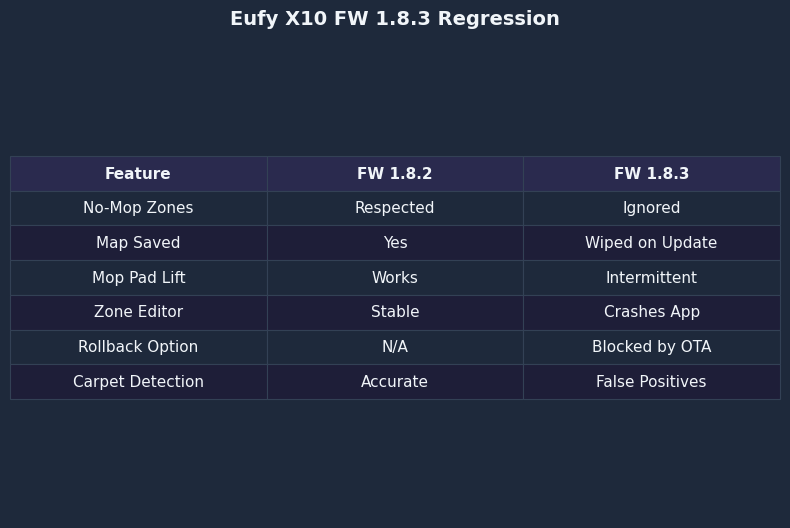
The side-by-side above compares mop-cycle behavior in 1.7.x versus 1.8.3 on the same home map. In 1.7.x, the robot’s water-pump-active trace terminates cleanly at the polygon boundary every time. In 1.8.3, the trace bleeds across the boundary in exactly the cases where the carpet sensor returns ambiguous readings — which in practice means nearly all low-pile and patterned rugs. The hardware is doing exactly what it did a month ago. Only the logic feeding it has changed.
The settled take
If your rugs matter to you, spend the ten minutes redrawing zones with a buffer and commit to two Sweep Only cycles before any mopping run until 1.8.4 lands. If you’re rug-light, pull the pads and wait. Rollback is a reasonable middle path but it needs a support ticket and costs you the good parts of 1.8.3. The regression is real, it’s isolated to the zone-intent resolver, and it is almost certainly a one-commit fix on eufy’s side. The patch will come. Protect your floors in the meantime.
- eufy: How do I update my X10 Pro Omni’s firmware? — the official flow for pushing and checking the current build number.
- eufy: Cleaning Modes and Logic of the X10 Pro Omni — describes how zone metadata is intended to interact with mopping.
- eufy: X10 Pro Omni (T2351) manual — the Map Management steps referenced above.
- eufy: X10 Pro Omni multi-floor mopping guidance — per-map zone metadata behavior for multi-floor households.
- TechRadar: eufy X10 Pro Omni review — independent baseline for how the mopping system was rated before the 1.8.3 regression.
- eufy Community: X10 Pro Omni map management thread — community-level notes on map editing without full deletion.
Common questions
Why are my eufy X10 Pro Omni no-mop zones being ignored after firmware 1.8.3?
Firmware 1.8.3 rewrote the zone-intent resolver that the eufy Clean app uses to serialize map metadata to the robot. Previously, a no-mop polygon was a hard exclusion. After 1.8.3, the flag is treated as advisory when carpet-detection confidence is below threshold, so the mop plates stay down on hard floor next to low-pile rugs. The app still renders the zone correctly, masking the regression visually.
How do I redraw no-mop zones so they actually work on eufy X10 Pro Omni 1.8.3?
Open eufy Clean, go to Map Management, and delete every no-mop polygon one at a time rather than editing them. Run a Sweep Only cycle, confirm zero zones remain, then redraw each polygon with roughly 15-20cm (a hand’s width) of padding past the rug boundary. Save, then run a second Sweep Only cycle to force the robot to re-read the new map before mopping.
Can I roll back eufy X10 Pro Omni firmware from 1.8.3 to 1.7.x?
Rollback is possible but not self-serve through the app. You must open a support ticket with eufy and request the previous build. A technician then drops a staged bundle to your specific device ID, and the process takes one to three business days. It’s worth pursuing if more than a third of your floor area sits under rugs you care about keeping dry.
Which rug types are most affected by the eufy 1.8.3 no-mop zone bug?
Low-pile cotton and jute rugs are hit hardest, according to Reddit post clusters in the X10 Pro Omni community. These surfaces return marginal carpet-detection confidence, which triggers the resolver’s new sanity-check behavior and causes the mop to stay deployed. Higher-pile rugs trigger carpet detection strongly enough that the old hard-exclusion behavior still mostly works, so they’re less commonly reported as problems.
You may also like


Leave a Reply